Your Order Data Is a Business Asset. Most Ecommerce Stores Treat It Like a Bin Bag.
The ecommerce brands that pull ahead over three to five years aren't always the ones with the best ads or the biggest budgets. They're the ones who know who bought, why they bought, where they came from, and what brought them back and they built that knowledge systematically, from order one.
The Problem Nobody Talks About at the Start
When you launch an ecommerce store, you're focused on getting sales. That's correct, you should be. But from that very first order, a clock starts ticking on data you'll never be able to recover.
Every order contains a signal. Where did that customer come from? What did they buy first? Was it a gift or for themselves? Was this their third time buying or their first? Most stores capture almost none of this in a structured way. Shopify records the order. Klaviyo sends the confirmation email. But nobody tags the record. Nobody writes the acquisition context to the customer profile. And six months later, when you're trying to figure out whether your Google Shopping spend is actually building a customer base or just generating one-off transactions, you have nothing real to work with.
The data existed. You just didn't keep it.
What Tagging Actually Means
Tagging in ecommerce means attaching structured, queryable metadata to your orders and your customers at the point of transaction and keeping it updated as behaviour evolves.
Not notes in the customer record. Not a spreadsheet someone updates manually. Structured tags that answer the questions your future self will ask.
There are two levels at which this works and it's worth understanding the difference between them because they serve completely different purposes.
Order level tags capture moment-in-time data. Things like what the product type was, what the sentiment on the card was, what channel the order came from. These relate to that specific order and they don't change. A corporate team sent flowers because a colleague lost their father. That's a moment in time. It belongs on the order record permanently.
Customer level tags capture the dynamic stuff, things that change based on purchasing habits. How many orders they've placed in the last 36 months. Whether they're a first, second or repeat buyer. Their average order value bracket. Whether they've been reactivated after a gap. These live at the customer level because that customer can flip, they can stop purchasing, they can increase their spend, they can shift from buying mostly birthday gifts to mostly sympathy.
The rule is simple: if it's a one-off moment in time, it goes at the order level. If it changes over time, it goes at the customer level.
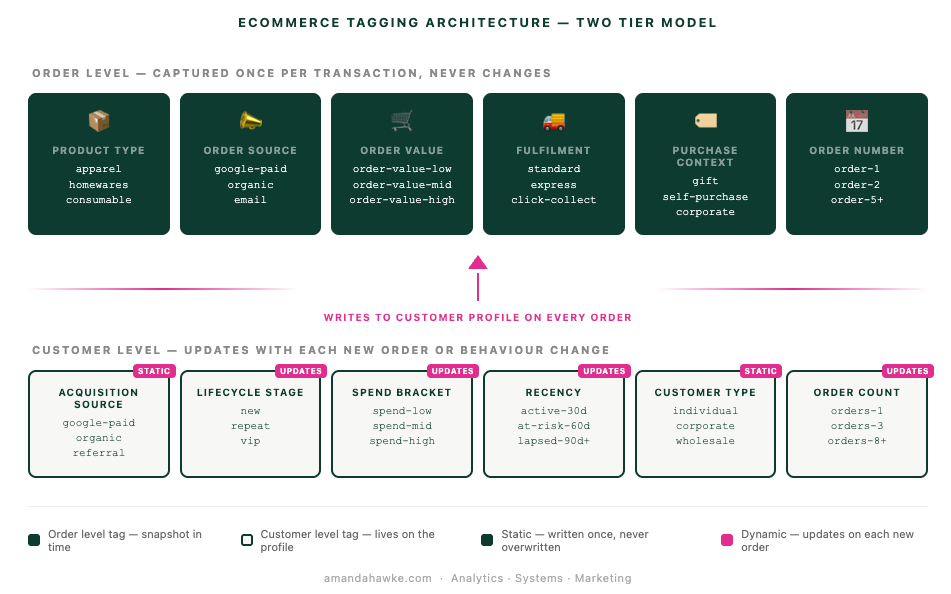
Acquisition Data Is the Most Perishable Asset You Have
Here's the thing that most business owners realise too late: acquisition data is easy to capture at the moment of the first transaction and nearly impossible to reconstruct later.
You can always pull last month's revenue by product. You can always run last quarter's email performance. But if you didn't record that a specific customer came in through a branded paid search campaign on the day a competitor went out of stock, that context is gone. You cannot reverse-engineer it.
This is why first order acquisition source belongs on the customer record permanently, not just in a UTM parameter that lives and dies inside a session.
The question "where does my best customer come from?" sounds like a marketing question. It's actually a data architecture question. If you tagged acquisition channel on every first order for the past two years, you can answer it in minutes. If you didn't, you're making educated guesses based on last-click attribution — which in a multi-touch world is rarely the full story.
A customer who found you through an organic search, placed a small first order, then came back within 30 days and spent three times as much, then became a quarterly repeat buyer — that's a pattern. When you have hundreds of that customer, tagged and queryable, you start to understand which acquisition channels actually produce lifetime value versus which ones drive one-off volume. That distinction alone is worth more than almost any other insight in your business.
Building the Customer Profile as a Living Record
Tagging at order level is the start. The real value comes when that data is written to the customer profile and updates with every interaction, building a picture of who that customer actually is and how they behave over time.
With the right architecture, every customer profile should be able to tell you: when they entered (first order date, acquisition channel, first product category), how they've moved (order frequency, average order value over time, product category evolution), where they are right now (days since last order, current lifecycle stage, spend bracket), and what they respond to (which campaigns converted them, which email flows they engaged with).
This is not complicated technology. In Shopify and Klaviyo this is achievable with automated flows running in the background on every order. No manual data entry. No analyst pulling CSVs every week. The data writes itself.
The critical requirement is that the schema is designed before the data starts flowing, or that a structured backfill project is run to retrofit the history you already have.
What This Actually Looks Like in Shopify and Klaviyo
Once your tagging architecture is in place, the practical application is straightforward. Here is how it works end to end.
Shopify tags and Shopify Flow are where your order and customer level tags live. Shopify Flow is the native automation tool that lets you build rules without code. You can set a Flow to trigger on order fulfilment, evaluate the order properties (product type, referral source, order count, etc.) and write the correct tags back to both the order and the customer record. Shopify's own help documentation covers Flow triggers and conditions in detail and it is genuinely accessible even if you've never built a workflow before.
One important note: if you're using Klaviyo for post-purchase communications, you need to use the Order Fulfilled event as your trigger, not Order Created or Payment. When an order is created, Klaviyo takes an immediate snapshot from Shopify. At that moment, the tags haven't been applied yet because Shopify Flow needs up to 15 minutes to process and write them back. By the time the order is fulfilled, all tags are in place and Klaviyo will have the full picture.
In Klaviyo, once your tags are flowing through consistently, you can build segments based on exactly this data. Go to Lists and Segments, create a segment, and use the condition "What someone has done" with the trigger set to "Fulfilled Order." From there you can filter by any tag. Want everyone who has placed a sympathy order in the last 90 days? That's one filter. Want everyone who did that AND is corporate? Add a second. The segment builds in real time.
Customer-level tags sit under "Properties About Someone" and you can access them from Shopify Tags within Klaviyo. This is where your lifecycle stage, average order value bracket, acquisition source and customer type live. These are the properties you use to build flows that actually speak to where the customer is in their journey. A first order flow, a second order nudge, a VIP milestone trigger, a reactivation welcome back sequence , all of these are only possible if the customer level data is there and accurate.
Every segment below is only possible because the tags exist on the customer profile. Here is what that looks like when you go to build it in Klaviyo.
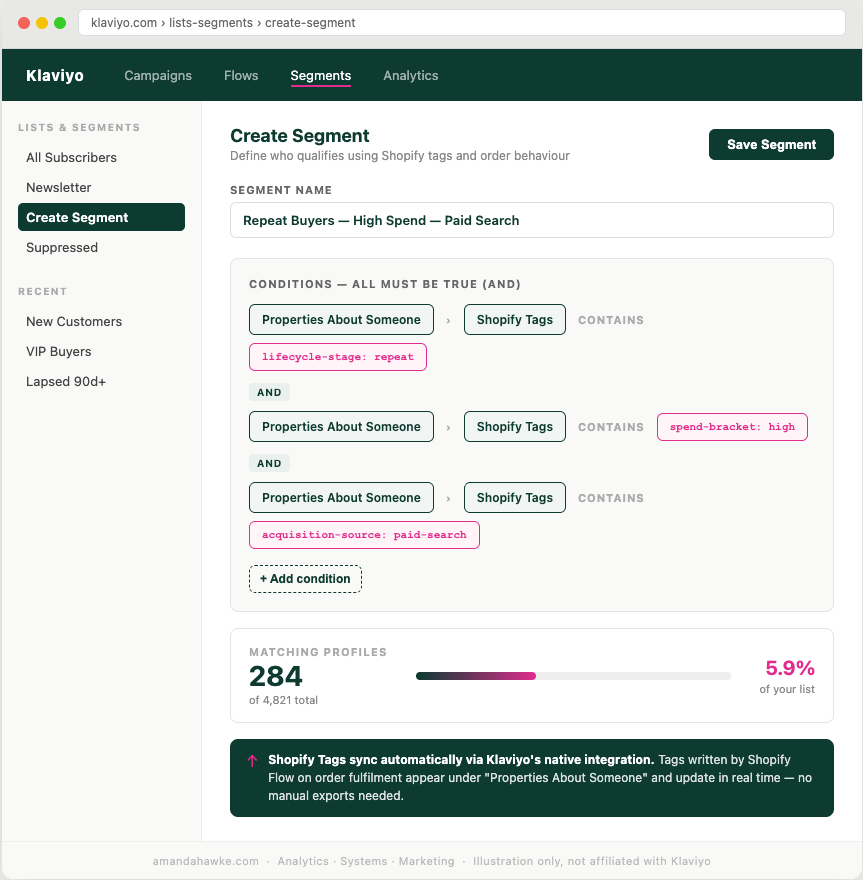
A practical segment example:
| Segment | Tags Required | Use Case |
|---|---|---|
| New customers | lifecycle-stage: new | Onboarding flow |
| Repeat buyers, high spend | lifecycle-stage: repeat, spend-bracket: high | VIP nurture |
| Lapsed customers | recency: lapsed-90d+ | Reactivation |
| Corporate buyers | customer-type: corporate | B2B outreach |
| Paid search acquirees | acquisition-source: paid-search | Channel ROI analysis |
Once you have even a few months of clean tagged data, the segments you can build start to get genuinely powerful. You can send a message that acknowledges a customer's history with you rather than treating every purchase like the first one.
The Purchase Window: What Your Tags Will Eventually Tell You
One of the most commercially useful things a tagged customer base reveals is time-to-purchase windows. How long it takes a first-time customer to come back for a second order, and what influences that window.
This determines how long your post-purchase email sequence should run, at what point a non-repurchasing customer should be treated as at-risk, whether a specific acquisition channel produces customers who convert quickly or slowly, and which first product purchase correlates with a shorter repurchase window.
None of this is visible without timestamped tagged order history at the customer level. When you have it, the patterns become clear: this customer type, acquired through this channel, with this first product, has a median repurchase window of X days. Customers who don't come back within 1.5 times that window have a significantly lower long-term retention rate. That's when tagging stops being an admin task and starts being a competitive advantage.
The One Thing That Makes All of This Worthless
Inconsistency.
If your acquisition channel tagging uses five different values for the same channel across 18 months, google, Google Ads, paid-search, google-paid, PPC, you cannot aggregate it. If your lifecycle stage tags get overwritten without a logic check, you lose the history. If some orders get tagged and others don't because a flow has a silent error condition, your data is biased and you won't know it.
Tagging architecture needs three things to hold value over time:
A fixed taxonomy with controlled values only, no free text. Automated writes with no human in the loop for standard classifications. And append-and-update logic where first-order acquisition tags are never overwritten, while lifecycle and recency tags update on a rule.
Get those three things right and the system compounds. Every order enriches the dataset. Every month of consistent data makes the patterns clearer. Two years in you have something genuinely irreplaceable.
Why This Is Your Longest-Term Business Asset
Your customer list, properly tagged, structured and continuously enriched, is the single most durable asset in your ecommerce business. Paid traffic stops the moment you stop paying. Product trends shift. Algorithms change. But a well-maintained, behaviourally tagged customer database that tells you who buys, why, how often and from where compounds in value every day you operate.
Most businesses discover this too late. They're three years in, sitting on tens of thousands of orders, and the data is a mess. The taxonomy is inconsistent. The acquisition history is lost. Rebuilding it requires either a significant backfill project or accepting that the first years of trading are analytically dark.
The businesses that treat order data as a strategic asset from the beginning don't have that problem. They know which acquisition channels produce customers who stay. They know which products start the relationship. They know how long the windows are and what shortens them. They know who their VIPs were before they became VIPs and they can start building the conditions that create more of them.
That's a compounding asset. Built tag by tag, order by order, from order one.
Where to Start
If you're reading this thinking you have none of this yet, start here.
Audit what you're already capturing. Most stores have more raw data than they think sitting in UTM parameters, Shopify referral sources and Klaviyo event properties. The question is whether it's structured and consistent enough to aggregate.
Define your taxonomy before you build anything. Every tag value you'll ever use. Write them down, agree them, lock them. Variation costs you more than it saves.
Build the first order acquisition tag as priority one. This is the one you cannot reconstruct later. If you can only do one thing, tag acquisition source on first order and write it to the customer profile permanently.
Automate from the start. Shopify Flow and Klaviyo flows handle the vast majority of this without developer involvement. If classification requires a human, it won't scale and it won't stay consistent.
Build reporting last. Clean taxonomy and consistent tagging first. Then the dashboards will tell you something true.
If you want to talk through how to get the most out of your business data, how to set up your tagging architecture, what to capture, and how to actually use it in Shopify and Klaviyo, get in touch at hello@amandahawke.com